

The Workshop
These are the games I’m working on right now, and they’re all prototypes.
That means things may change while you’re playing them. I’m still tweaking rules, fixing problems, trying ideas, and figuring out what makes each game better.
I hope you’ll try them out and have some fun with them. If you have feedback, whether it’s something you love, something you hate, or something that just feels off, I’d really like to hear it.
Your feedback helps me make these better before I try to get them into the App Store.
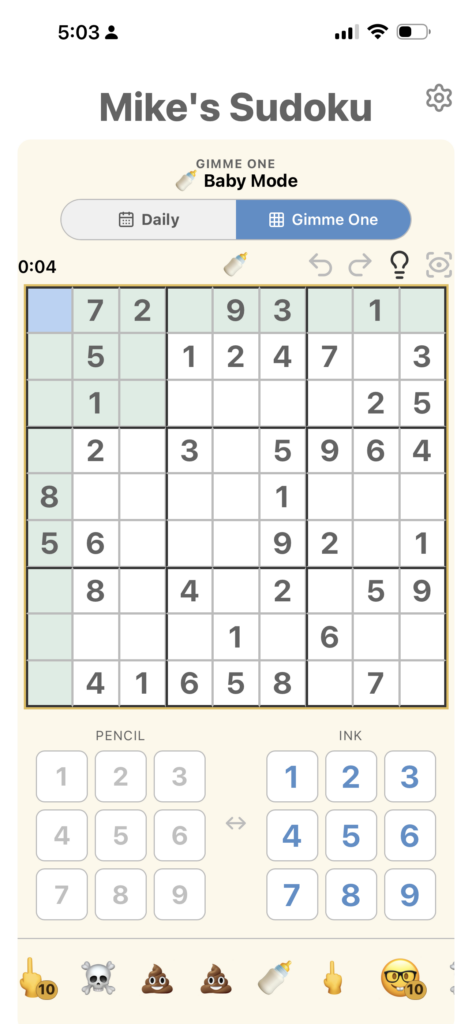

Mike’s Sudoku in TestFlight Beta
I’ve played a lot of Sudoku and tried a lot of Sudoku apps. None of them had everything I wanted in one place, so I made my own.
Mike’s Sudoku has all the basics I like, but I’ve also added little things I always wished other apps had. Enter a number and every matching number briefly grows larger, so you can instantly see where they are on the board. Drag across several empty cells and you can pencil the same candidates into all of them at once. And the hint system doesn’t just give you an answer. It helps you see the logic that gets you there.
There are Daily puzzles, different difficulty levels, trophies, progress tracking, undo and redo, and plenty of other small details I’ve added simply because they make Sudoku better to play.
Basically, it’s the Sudoku app I wanted to find but couldn’t.
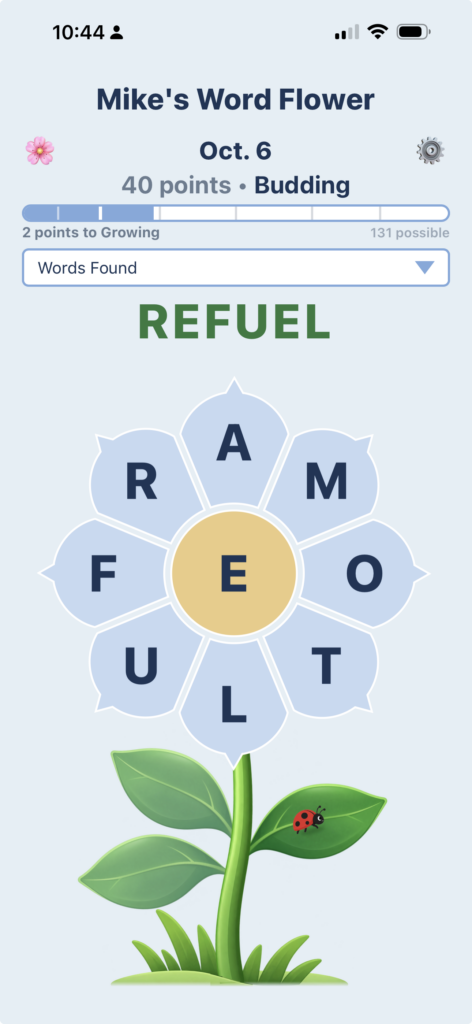

Mike’s Word Flower (prototype)
The first game here I actually invented!
The basic idea came first: make words by dragging through a flower, always using the center letter. But most of the work since then has been figuring out what should happen after the obvious words are gone. Scrambling the petals gives you a fresh way of seeing the same letters, and as you get farther into a puzzle the game gradually starts helping—showing the length and first letter of missing words, and eventually tracing a path through the flower if you want a stronger hint.
A surprising amount of the design has been about the words themselves. I’ve been building a separate word engine alongside the game to decide which words feel common enough to expect someone to find, which should be Bonus words, and which obscure-but-legitimate words should simply be accepted as Extra Finds. I can now review borderline words individually and override the engine when it makes a choice that doesn’t feel human. That part has turned into almost as much of a project as the game.
The scoring and sense of progress have changed several times too. The current version rewards longer words, moves through eight levels as you play, and has special milestones: Bloom for finding all the regular words, Full Bloom for finding the bonus words too, and Petal Power for finding a word that uses the entire flower. We’ve experimented with different progress graphics, flower-growth stages, what information appears in the Words Found panel, when hints should appear, and even a six-petal version to see whether a simpler flower produced a better game.
It’s also becoming more of a daily game rather than just a collection of puzzles. There’s a new Flower each day, a calendar for going back to earlier ones, streaks and stats, sharing, saved progress, and a growing history of what you’ve played. I’m also experimenting with the little things around the puzzle—the opening animation, how the flower changes as you make progress, celebrations, and how much the game should reveal without taking away the satisfaction of finding a word yourself.
The part I’m still tuning is the balance between challenge, discovery and kindness. I want the beginning of a Flower to feel wide open, the middle to make you look at familiar letters differently, and the end to give you just enough help that finishing feels possible without the game simply handing you the answers.
That’s really what this prototype is for.
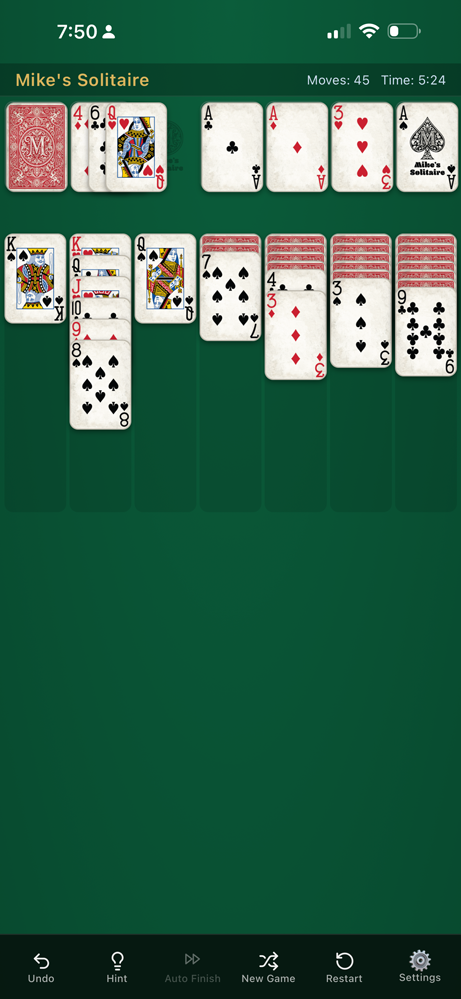
Mike’s Solitaire (prototype)
This started as an attempt to make regular Klondike feel better to play.
The rules are still the familiar ones: build descending alternating-color stacks, uncover the hidden cards, and move everything up to the four foundations. You can play 1-card or 3-card draw. I’m not really trying to reinvent solitaire as much as figure out why some versions feel effortless and others feel fiddly.
A surprising amount of the work has been about card movement. I’ve experimented with how quickly cards travel, how they flip, how a stack follows your finger, what happens when you flick a card, and what a tap should mean when there’s more than one possible move. Dragging lets you put a card exactly where you want it; tapping tries to figure out the move you probably intended. Even things like how far crowded columns spread apart and what happens when there isn’t enough room on a phone have gone through a lot of versions.
Some features came directly from things that annoy me in other solitaire games. There are useful hints, Undo and Redo, 1-card and 3-card draw, and Auto Finish for the point where you’ve clearly won and moving another 30 cards by hand isn’t accomplishing anything. Auto Finish itself has been redesigned several times just to get the timing and motion to feel right.
I’ve also been experimenting with the cards themselves. The current deck has a worn, slightly dirty physical quality instead of looking perfectly digital, and I’ve tried different card faces, backs, textures and ways of rendering them so the wear doesn’t just repeat identically from card to card.
A lot of ideas have been tried and then pulled back. I experimented with automatic tips that would notice repeated mistakes, for example, but I don’t want the game constantly interrupting you or explaining itself. That has become a bigger design rule for the whole thing: help when help is useful, then get out of the way.
The game has also turned into a fairly serious mobile-design experiment. I’ve spent a lot of time testing it on phones and iPads in portrait and landscape, working through cramped stacks, touch targets, scrolling, board movement, accidental drags, interrupted animations and all the strange little things that happen when a tabletop card game has to fit on a small screen.
There are still things I’m trying, and I keep finding tiny behaviors that can be better. That’s really what this prototype is about. It’s still just Klondike Solitaire — but I’m seeing how good the familiar game can feel when all those little details are treated as part of the game rather than just the interface around it.
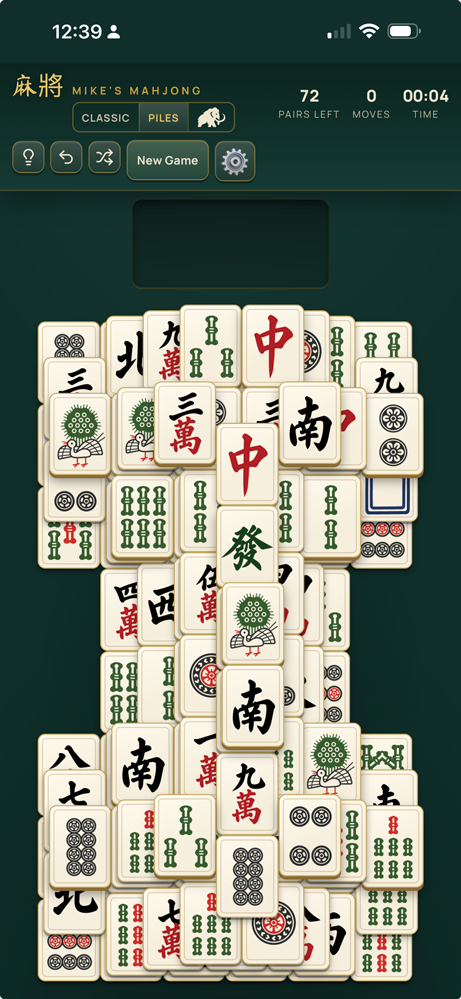

Mike’s Mahjong (prototype)
This one started with a friend asking me to make a Mahjong game, and it has turned into a much bigger experiment in how a simple matching game can feel.
The basic idea is easy: find free matching tiles and gradually take the pile apart until nothing is left. But pretty quickly I became more interested in everything happening around that simple action — how you choose a tile, how it moves, what happens when you find its match, and whether dismantling a complicated pile can feel almost physical.
The game has gone through a lot of experimentation. Instead of just making one traditional layout, I started building different Piles with their own shapes and personalities — towers, courtyards, staircases, mesas and other structures. The regular game currently uses 84 tiles, which turned out to be a nice size for a phone: enough of a puzzle without turning the screen into visual soup.
There’s a small tray involved in the way matching works. Tap a free tile and it moves into the tray; find its partner and the pair disappears. I’ve spent an unreasonable amount of time tuning that tiny sequence — the speed of the tile, the sound when it lands, how the tray recenters itself, and the little burst of sand when a match disappears. Those details don’t change the rules, but they change the way the whole game feels.
I’ve also been experimenting with what the tiles themselves can be. Along with the traditional Classic set, I made a Garden set using flowers, leaves and fruit, with centipedes, grasshoppers and moths standing in for the dragons. You can switch sets without restarting the game, which led to a larger idea that the same puzzle could have very different visual personalities without changing how it plays.
Then there’s Woolly Mammoth. At one point I wondered what would happen if I made a completely ridiculous Mahjong pile with 576 tiles. That became partly a game mode and partly a stress test. Getting hundreds of overlapping tiles, face-down tiles, animations and effects to remain smooth on an iPhone forced me to rethink how much of the board actually needs to be fully rendered at once. It’s exactly the kind of unnecessary experiment that has ended up teaching me a lot about the rest of the game.
Some of the work has been about what not to add. I don’t want timers, lives, currencies, streak pressure or a bunch of systems trying to convince you to keep playing. I keep coming back to the same idea: choosing a tile should feel good, finding a match should feel good, and slowly turning a complicated pile into nothing should be enough of a reward.
That’s where the prototype is now. There are different piles and tile sets, Undo, hints, saved games and some deliberately oversized experiments, but I’m still adjusting very small things — movement, spacing, sounds, effects, which tiles are easy to read, and how much the game should help you.
It’s becoming less about making another Mahjong game and more about finding the simplest version that I’d actually want to sit down with for a while.
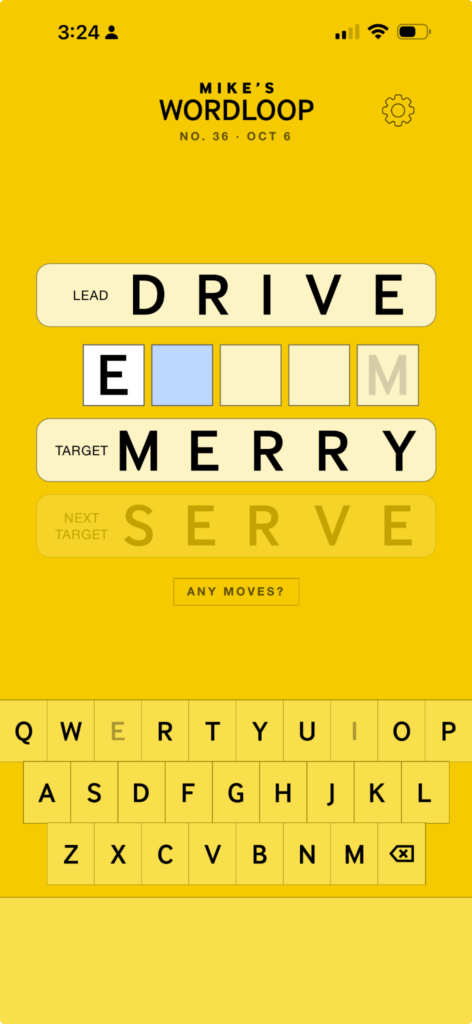

Mike’s Word Loop (prototype)
Word Loop started with a very small idea: what if the last letter of one word forced the first letter of the next?
From there it gradually turned into a daily word puzzle about finding your own route between two Anchor words. You begin with a Lead Anchor and a Target Anchor. Every word is five letters, and each new word has to start with the last letter of the word before it. Reach the Target, the Anchors switch roles, and you work your way back until the loop closes.
That basic structure came together pretty quickly. Figuring out whether it could become a genuinely good daily game has taken much longer.
One of the first things I became interested in was hiding the route while you play. Instead of showing an ever-growing word list, the game only gives you three rows: where you are, where you’re going, and the blank space between them. Old words disappear as you move forward. When you finally close the loop, the entire route you created is revealed at once.
That changed the feeling of the game quite a bit. You aren’t staring at your previous solution and optimizing it as you go. You’re just trying to figure out what word can get you somewhere useful next.
The rules have also gotten stranger as I’ve tested it. One important addition is a vowel restriction: vowels appearing in your current Lead word can be unavailable in the next word. That sounds like a small complication, but it made choosing the Anchors much more important and produced much more interesting decisions. A pair of perfectly ordinary words can create either a great puzzle or a terrible one depending on the routes between them.
A lot of the work now goes into finding those good pairs. I’ve been testing how many possible routes a puzzle should have, how short the best route can be before it becomes too easy, how many reasonable first moves a player should have, and how to make sure someone doesn’t wander into a position with nothing legal left. There’s even a safeguard that can check whether any moves remain rather than quietly leaving you trapped.
I’ve experimented with the overall structure too. At one point I built a three-Anchor version where you traveled through three different legs before closing the loop. It worked, but I ultimately came back to the simpler two-Anchor idea. That kind of testing has been useful: adding another rule or feature often makes the game more elaborate without actually making it more fun.
The Secret Word came out of another experiment. Every Daily has a hidden word, and after solving you can choose whether to reveal it. If that word appeared somewhere in the loop you made, you gain points; if it didn’t, you lose them; or you can simply Pass. I like that it rewards something you did naturally during the solve instead of giving you another task while you’re playing.
There’s been a surprising amount of work on the less glamorous parts too: deciding which words should count, making the keyboard react immediately, showing forbidden letters clearly, choosing familiar Anchor words, balancing easier and harder Dailies, and generating enough puzzles that they don’t start feeling like variations of the same route.
I’ve even been building and testing a large pool of possible Daily puzzles rather than just generating one randomly each morning. That lets me reject puzzles with brittle routes, obscure words, too few choices, or solutions that are technically valid but just aren’t much fun.
I’ve tried ideas for a calendar of past Dailies, richer scoring, different post-game statistics, and more elaborate ways of comparing solutions. Some will probably come back. For now I’m trying not to build too much around the game until I’m convinced the central thing — making your own strange little chain of words and eventually discovering the loop you created — is strong enough on its own.
That’s really what this prototype has become: less an exercise in inventing more rules and more an attempt to discover exactly which rules make a very simple idea interesting.